

- Home
- Products & Solutions
- PDM Product Data Management
- Seamless integration of 2D/3D CAD
CIMer 2D / 3D CAD Seamless Integration
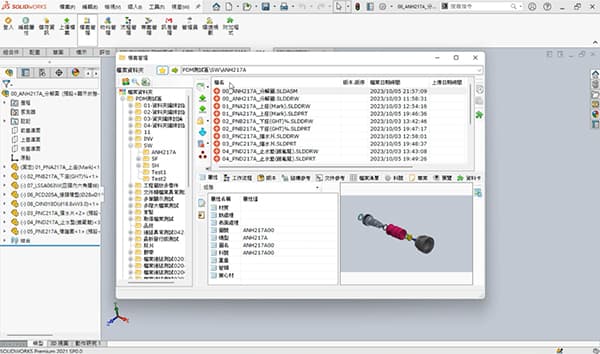
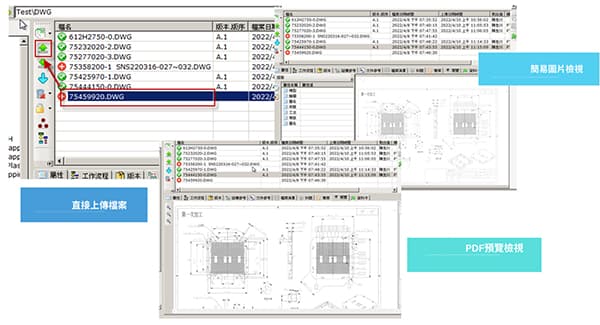
CIMer's "seamless integration of 2D/3D CAD" is one of its core competencies in Taiwan's manufacturing industry. "Seamless integration" means that engineers can complete all operations—including drawing management, check-in/out, BOM creation, revision, workflow management, release, and ECO—without leaving the CAD software. Therefore, "PDM will not disrupt the design process," and the engineer's user experience and the high degree of automation in data synchronization are highly appreciated by many engineers.
Seamless integration of traditional PDM and CIMer CAD
| Traditional PDM (manual management) | CIMer Seamless Integration (Embedded Management) |
|---|---|
| Operational disruptions: Designers need to frequently switch between CAD software and PDM interfaces, manually performing "check-in/check-out" operations, which can easily interrupt the design flow. | Design as Management: PDM functionality is directly embedded in the menus of SolidWorks, Creo, Inventor, or NX. Engineers simply "save," and the system automatically handles version control and attribute synchronization. |
| Repeated attribute entry: Information in the diagram and PDM system often require repeated logins, resulting in a high error rate. | File locking mechanism: Directly displays whether a file is being modified by someone else within the CAD environment, avoiding access conflicts during remote collaboration. |
| BOM output: Either manually generated by an engineer or exported to Excel and then manually modified. | Background synchronization: Combined with a distributed architecture, large components are automatically cached in the background, eliminating the noticeable network latency. |
Through CIMer CAD's seamless integration architecture, mainstream 2D and 3D CAD software such as SolidWorks, Creo, NX, Inventor, Solidedge, CATIA, Iron CAD, AutoCAD, and DWG Viewer can all be integrated into CIMer CAD. This allows for Check-In/Out, BOM, Revision, and Workflow processing, making CAD the PDM (Product Development Management) entry point. Different CAD software can coexist on the same platform, which is crucial for OEMs and ODMs.
1
CAD Embedded Integration
The "embedded CAD integration" is not just a plug-in file management system, but a direct integration of Feature Tree, Assembly, Property, Config, and Drawing. Therefore, engineers can archive, publish, query, revise, and create BOMs directly within the CAD software.

2
Seamless Check In / Check Out
The core PDM features include: automatically locking the assembly process when an engineer initiates it, and allowing others to only read it. This avoids overwriting files, conflicts between multiple users, and the possibility of older versions overwriting newer versions, and ensures that "engineers do not need to leave the CAD environment."
3
Automatic BOM extraction
From 3D assembly, automatic part parsing, and EBOM creation. No need for manual Excel creation or re-entering of part numbers; synchronizes Part Number, Description, Material, and Revision. Completes the linking of BOM and CAD, forming a complete digital chain from "CAD → BOM → ERP".
4
Image and model association
One of CIMer's biggest features is its "automatic 2D and 3D linkage." When the 3D Model and 2D Drawing are updated with changes in size or assembly, the 2D model can be updated synchronously, and it can record Revision, Version, and ECO history.
5
CAD Property Automatic Synchronization
CAD attributes, PDM fields, Part No., Material, Weight, Rev., etc. are automatically synchronized to avoid manual input errors and inconsistencies in ERP data.
6
Assembly Correlation Analysis
CIMer can analyze large assemblies at the top, sub-assemblies, parts, and standard parts, as well as their location, parent-child relationships, and which products are affected. This is crucial for ECO impact analysis.
The true value of seamless integration with CIMer CAD
Achieving "design as management" makes system management invisible, thereby maximizing R&D efficiency. It liberates engineer productivity by directly embedding into CAD interfaces (such as SolidWorks, Creo, and other mainstream CAD software), eliminating the need for designers to manually import files by switching windows, allowing them to focus 100% on product innovation. Zero-error data synchronization ensures that element attributes are automatically synchronized with the PDM, completely eliminating BOM errors caused by manual input and reducing rework costs in subsequent procurement and manufacturing. Seamless cross-border collaboration is achieved through distributed caching and automatic locking mechanisms, enabling global teams to collaborate as smoothly as if in the same office, significantly shortening time to market (TTM).

Paperless CAD

Viewer (no CAD license required)

Workflow Seamless Integration

Workflow + CAD integration
Design is the process
Multi-site, global CAD collaboration platform
CIMer seamless integration becomes the core of digital R&D.
Many companies currently use CAD + NAS + Excel, leading to BOM errors, disorganized revisions, uncontrolled ECO processes, and difficulty finding the latest version. CIMer solves the problem of multi-CAD + Workflow + BOM, especially for companies with multiple CAD systems, frequent revisions, complex BOMs, and multi-person collaboration. Future development will also include AI-powered similar part search, AI-powered drawing search, AI-powered BOM analysis, and an AI-powered design knowledge base.
Consulting services