

- Home
- Products & Solutions
- Materials Management
CIMer Material Management (BOM)
The core of "materials management" is actually the "PDM + BOM + ERP integrated architecture," which not only manages part numbers but also connects CAD drawings, parts, assemblies, BOM, ECO, and ERP together. This is also one of the key points that is often adopted in Taiwan's manufacturing industry.
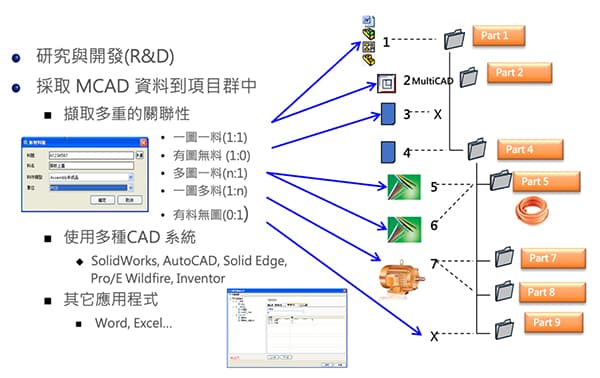
Traditional Materials Management vs. CIMer Materials Management
| Traditional materials management | CIMer Material Management |
|---|---|
| Information gap: Bills of Materials (BOMs) are often manually entered into the ERP system from drawings, which is prone to errors and time-consuming. | Automated BOM conversion: Directly generates material information from CAD models, realizing "design as material" and reducing human error. |
| Difficulty in tracking changes: When Engineering Changes (ECNs) occur, purchasing and warehousing departments may not be aware of them in a timely manner, leading to the purchase of incorrect materials or the accumulation of old materials. | Lifecycle management: The status of materials from R&D and prototyping to mass production is clearly visible and closely integrated with the change management process. |
| Maintenance difficulties: Material specifications and physical files are stored separately, making them inconvenient to find. | Integrated graphic and textual information: Material codes are directly linked to drawings and technical documents, enabling more accurate cross-departmental access. |
CIMer BOM Management Function: "Design is the source of materials" avoids manual re-entry of BOM, ERP part number errors, manufacturing based on old drawings, and incorrect material procurement.
1
Automatically generate BOM
Assembly information can be directly extracted from CAD software such as Solidworks, Creo, NX, Inventor, Solidedge, CATIA, and IrnCAD.

2
Multi-level BOM architecture
Automatically creating hierarchical, multi-level EBOM, MBOM, SBOM, and tree-like structures without manual table creation is a highly valued feature for many medium and large-scale manufacturing industries.
3
Automatic part number management
It can automatically create part numbers, coding rules, category management, and shared parts management. This avoids duplicate material creation, different names for the same part, and disorganized ERP data.
4
Image and part number association
"Drawings ≠ Independent Files" Drawings are fully integrated with 3D CAD, part numbers, BOMs, and ECOs. Modifications to the drawing and BOM are synchronized, revisions are synchronized, and the ERP system is notified.
5
Access Control and Cybersecurity
It can restrict which departments can view the BOM, which suppliers can download it, and which components cannot be leaked. It can also record who modifies, downloads, and distributes the data, meeting ISO auditing and information security requirements.
The core value of CIMer material management
Many companies mistakenly believe that "BOM = Excel," but the real problems lie in different BOM versions, outdated ERP systems, disconnected drawings from part numbers, and a lack of synchronization between R&D and the factory. CIMer addresses this by incorporating ESG/carbon footprint material sourcing, RoHS compliance, and other standards into the "R&D data chain," and gradually integrating them into PLM.

CAD drawings

PDM Parts Data

EBOM (Engineering Bill of Materials)

Workflow
ERP BOM / Purchasing / Manufacturing / Inventory