Custom Packaging Machinery Manufacturer: Migrating from SolidWorks EPDM to CIMer PDM
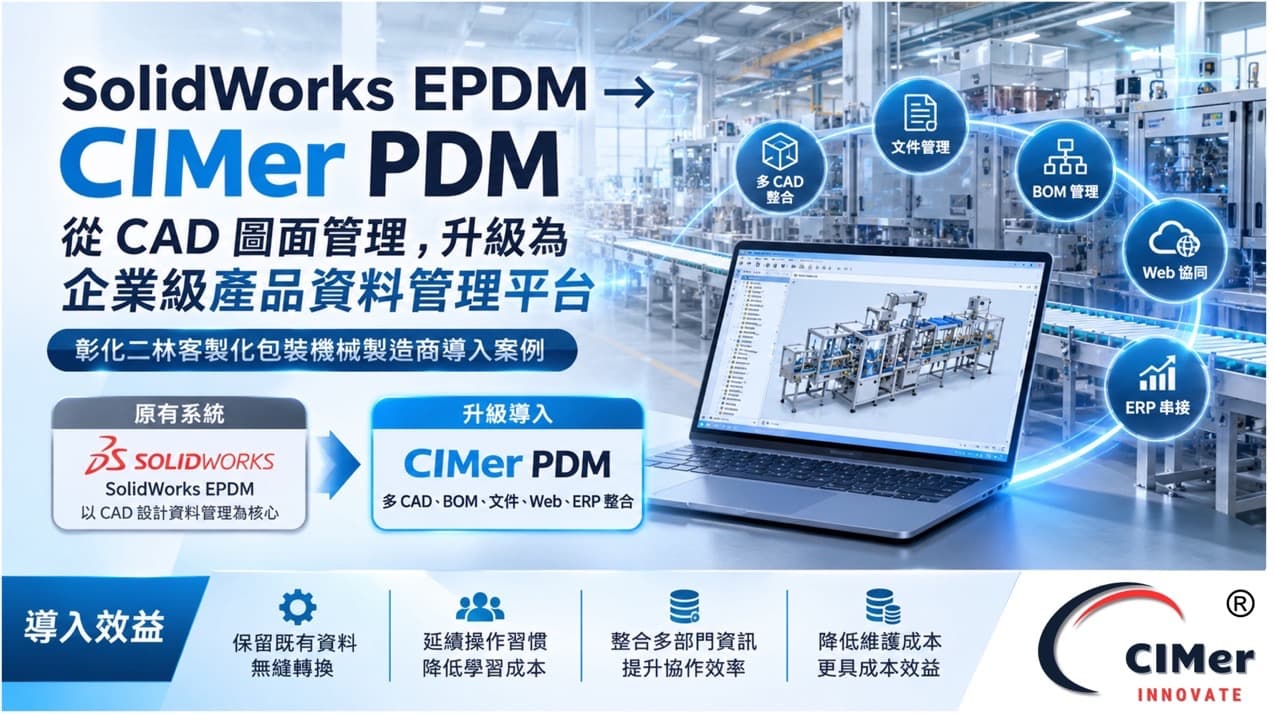
How a custom machinery manufacturer upgraded its PDM from CAD file management to an enterprise product data platform.
1. 30-Second Summary
Customer:
A custom packaging machinery manufacturer in Erlin Township, Changhua County, whose products are designed to customer specifications.
Previous system:
SolidWorks EPDM, mainly managing SolidWorks design files.
New solution:
CIMer PDM, with existing EPDM data migrated in batches according to agreed rules.
Key difference:
The scope of management expanded from CAD files to multiple CAD systems, Office / PDF documents, BOMs, materials and projects.
Users:
Expanded from engineers to purchasing, production planning, quality assurance, sales and management, who can query data through the Web according to their permissions.
Cost structure:
SQL Server CAL 1U licensing is available, with no restriction from SolidWorks version upgrades.
2. Customer Background
| Item |
Details |
| Customer type |
Custom packaging machinery manufacturer |
| Location |
Erlin Township, Changhua County |
| Product characteristics |
Designed to customer requirements, with different specifications, mechanical configurations and parts for each machine |
| Previous system |
SolidWorks EPDM (Enterprise PDM) |
| Solution adopted |
CIMer PDM |
| Key focus |
EPDM data migration, SolidWorks integration, multi-CAD management, Web collaboration, BOM and ERP integration |
Every custom machine requires mechanical design, part development, assembly configuration, engineering drawings, BOMs and design changes, so R&D data keeps accumulating. When a PDM can only manage CAD files, it is hard to support cross-department collaboration and information integration.
3. Before: Four Limitations
1
Management limited to CAD:
Centered on the SolidWorks ecosystem, making it hard to integrate other CAD systems and document formats.
2
Hard for non-CAD departments to find data:
Purchasing, production planning, quality assurance and sales had to go back and ask the R&D department.
3
Data stayed in R&D:
BOM and material information could hardly extend to purchasing, production and ERP, creating a gap between design and manufacturing.
4
Version dependency and licensing cost:
EPDM had to stay version-compatible with SolidWorks and was licensed per user, so adding users or upgrading pushed up long-term costs.
4. Solution: Five Measures
1
Migrating existing EPDM data by rules
Batch-import CAD design files, file properties and fields, assembly structures, versions and confirmed product data, without rebuilding the database and reducing manual entry.
2
Keeping familiar SolidWorks operation
CIMer PDM is integrated into the SolidWorks interface, so engineers do not need to readapt; general users work in an interface similar to Windows File Explorer, reducing training effort.
3
Integrating multiple CAD and document formats
Supports SolidWorks, Siemens NX, Autodesk Inventor, Solid Edge, PTC Creo, AutoCAD, Microsoft Office and Adobe document formats, so there is no need to build separate management environments for different tools.
4
Web platform for cross-department collaboration
Through a browser (including iOS and Android), users can query product drawings, engineering documents, BOM structures, material information, project data and version approval status according to their permissions.
5
Connecting BOM, materials and ERP
Provides material and project management, and supports BOM transfer and import with Digiwin Workflow ERP, TIPTOP, Epicor and SAP; special requirements can be met through custom integration using the CIMer API.
5. Before vs. After
| Aspect |
Before: EPDM |
After: CIMer PDM |
| Management positioning |
Mainly SolidWorks drawing management |
Enterprise platform covering CAD, documents, BOMs, materials and projects |
| CAD support |
Mainly the SolidWorks ecosystem |
Supports SolidWorks, NX, Inventor, Solid Edge, Creo and AutoCAD |
| Existing data |
Stored in the original EPDM |
Migrated in batches by rules, preserving R&D data |
| Users |
Mainly engineering and design staff |
Engineering, purchasing, production planning, quality assurance, sales and management |
| Operation |
Mainly CAD / PDM environment |
SolidWorks integration + Web interface |
| Document management |
Basic document management |
Unified management of CAD, Office and PDF |
| BOM and materials |
Depends on system functions and integration methods |
Provides material management; BOMs can be transferred to ERP |
| ERP integration |
Depends on existing integration solutions |
Supports Digiwin, TIPTOP, Epicor, SAP and API |
| Version dependency |
Must stay within a compatible range with SolidWorks |
Can manage data from different SolidWorks versions |
| Licensing model |
Per number of users |
SQL Server CAL 1U database licensing available |
Process differences
| Process |
Before |
After |
| Drawing lookup |
Had to ask the R&D department |
Query directly on the Web according to permissions |
| Data source |
Drawings, documents and BOMs scattered |
Managed centrally on a single platform |
| BOM transfer |
Compiled and passed on manually |
Can be transferred or imported to ERP |
Cost structure
| Item |
Description |
| SolidWorks annual maintenance |
About 25%~28% |
| EPDM annual maintenance |
About 15%, and version compatibility must be maintained |
| CIMer licensing |
Can be planned with SQL Server CAL 1U, unaffected by SolidWorks version upgrades |
Actual costs must still be confirmed based on the purchased version, number of licenses, deployment method and maintenance plan.
6. Benefits
Preserve R&D assets:
Existing data is imported by rules, with no need to rebuild from scratch.
Lower learning cost:
Familiar SolidWorks operation is retained, reducing the impact of the transition.
Centralized product data:
CAD, documents, BOMs, materials, projects and version processes are unified.
Higher cross-department efficiency:
Purchasing, production planning, quality assurance, sales and managers can look up information themselves, reducing back-and-forth questions.
A foundation for ERP integration:
R&D data can extend to purchasing and manufacturing.
Better long-term cost of ownership:
Removes the limits of version dependency and per-user licensing.
7. FAQ
Q1. Can EPDM data be fully moved to CIMer?
Yes. CAD files, property fields, assembly structures, versions and designated data are migrated in batches according to agreed rules, without rebuilding the database.
Q2. Will the conversion affect engineers' daily design work?
The impact is limited. CIMer is integrated into the SolidWorks interface, so the way of working continues.
Q3. Besides SolidWorks, which formats can it manage?
NX, Inventor, Solid Edge, Creo, AutoCAD, as well as Office and Adobe documents.
Q4. How do non-engineering departments look up drawings?
Through a browser or mobile device, they can query drawings, documents, BOMs, materials and approval status according to their permissions.
Q5. Can older versions of SolidWorks also be converted?
Yes. The conversion method is planned according to the actual environment and data structure, with no restriction to specific versions.
8. Conclusion & Contact
For this custom packaging machinery manufacturer in Erlin, Changhua, switching to CIMer PDM is not just replacing a drawing management software. It extends PDM from SolidWorks file management into a long-term architecture that integrates design data, documents, materials, BOMs, projects and cross-department information.
When evaluating a PDM, companies should look beyond whether it can manage CAD today, and consider whether it can support multi-CAD integration, cross-department collaboration and ERP integration in the future.